AIAC Presents · Inlet Connect
Meet Claudia .
Your thinking partner, installed on your own computer.
Warm open. Let the room settle. By the end they will have her installed and connected to one tool.
Tell them to have Terminal (Mac) or PowerShell (Windows) open already.
Your host
Kamil Banc
Founder of AI Adopters Club, and a fellow Inlet Connect member. I build AI that works like a partner, not a chatbot. Claudia is the result.
aiadopters.club
30 seconds. You are one of them, a member, not an outside vendor.
Quick read of the room: who has used any AI seriously yet?
The issue
AI forgets you.
Every chatbot starts from zero. You re-explain yourself every single time.
The real ceiling is not intelligence. It is memory.
The quote you didn't chase.The follow-up that slipped.
Your memory is the bottleneck. Not your effort.
This room runs on relationships and follow-through: realtors, marine, home services, coaches.
Name the pain plainly: revenue lost not because you are lazy, but because no one can hold it all in their head.
The insight
What if it remembered ?
A partner that holds your whole book of business. Runs on your own machine. Private, yours, and it never resets.
The shift: from a tool you query to a partner that knows your world.
Local and private matters to this room. Client data stays on your machine.
The build order
The Four Cs .
→
Connections
she sees your world
→
Capabilities
she does the work
→
Cadence
she keeps doing it
first, build her memory
then, put her to work
This is the order. You don't rush it. The more you use her, the more you'll want the next step.
This is the spine of the whole workshop. Everything we do today is one of these four.
Context and Connections build the second brain. Capabilities and Cadence turn it into an operating system.
Reassure them: you do not need all four today. Get Context plus one Connection and you are already winning.
C1 · Context
Who you are.
First, get her running. Then she learns you.
Hands-on starts now. Context means install her, then onboard.
Install · step one
claude.com/claude-code
Install Claude Code, then sign in with your Anthropic account (the claude.ai one). Your Claude Pro plan covers it.
Drop the link in chat. Each OS has its install command on that page.
The #1 question every time: yes, Claude Pro covers Claude Code. No API billing for 99% of you.
Wait here. People install at different speeds.
Install · step two
npx get-claudia
Run it from your Documents folder. She creates her own folder, so don't make one called "claudia" first.
The Claudia Rule
Hit an error? Copy it, paste it into Claude, ask. That is the only debugging skill you need today.
The four commands: cd ~/Documents, then npx get-claudia, then cd claudia, then claude.
The folder warning trips up half of every workshop. Say it twice: do not name a folder claudia.
This is the Claudia rule, buried right where they hit their first error. Copy, paste, ask. It works for any tool error in their life, not just this one.
Install runs 2 to 5 minutes (the local model download). While it runs, mention nothing leaves their machine.
Say hi .
She asks your name, your role, and how you work. That is Context. She remembers it every time you open her, from now on.
First real interaction. The richer their answers, the better she personalizes.
She is quietly detecting their archetype and writing the file she loads every session.
C2 · Connections
Your real data .
This is the hinge. Without connections she is a smart local notebook. With them she is a chief of staff.
80–90%
of the value comes from connections. Start with two: your email and your meeting recordings .
If they set up only one thing after today, it is a connector.
Email gives her your communication. Transcripts (Otter, Granola) give her your meetings. Together she knows what you said, to whom, and when.
In Claude Desktop → Settings → Connectors
Gmail · Calendar · Drive
Otter · Granola · Airtable
Stripe · QuickBooks · 500+ more
Simple OAuth per tool. They sign in, Claude gets access.
Ask the room which they want first. Realtors: Gmail and Calendar. Service businesses: invoicing and email.
C3 · Capabilities
What she does .
Now she does the work, not just remembers it.
What she actually does.
Morning brief
Your day, sorted.
Commitments, calendar, who to follow up with. The daily-driver command.
Drafts you approve
She writes. You send.
Follow-ups, proposals, replies in your voice. She never sends on her own.
Capture
Drop it in.
A recording, a voice memo, a photo of a note. She pulls out what you need to do.
Your own helpers
Build a team.
Little helpers you name for your repeat work. They do the busywork, you make the calls.
About 20s each. These are live-demo candidates from your own install.
"I'll send that Friday" gets auto-logged as a commitment. That alone sells this room.
Drafts you approve: hammer the safety line. She organizes and drafts, you decide and act.
Live demo
Meet
▶ Open the demo
claudia.aiadopters.club/inlet-connect
Show, don't tell. Open the page in a new tab.
Use the search box. Type two or three people in the room and read their tailored use cases out loud.
Land it: these came from your real business profiles. This is Capabilities pointed at your actual work.
The named agents are examples of a team she helps you build, not defaults that ship.
Keep it to about three minutes, then come back to the deck.
Search the room
Type any member's name to pull up their dossier inline.
Shows name, city, tagline, bio, and each business with role, industry, and description.
Click a name chip if multiple names match.
Escape key clears focus and returns keyboard nav to the deck.
C4 · Cadence
She runs onher own .
The last C. Where she stops being a tool you open and becomes part of how you operate.
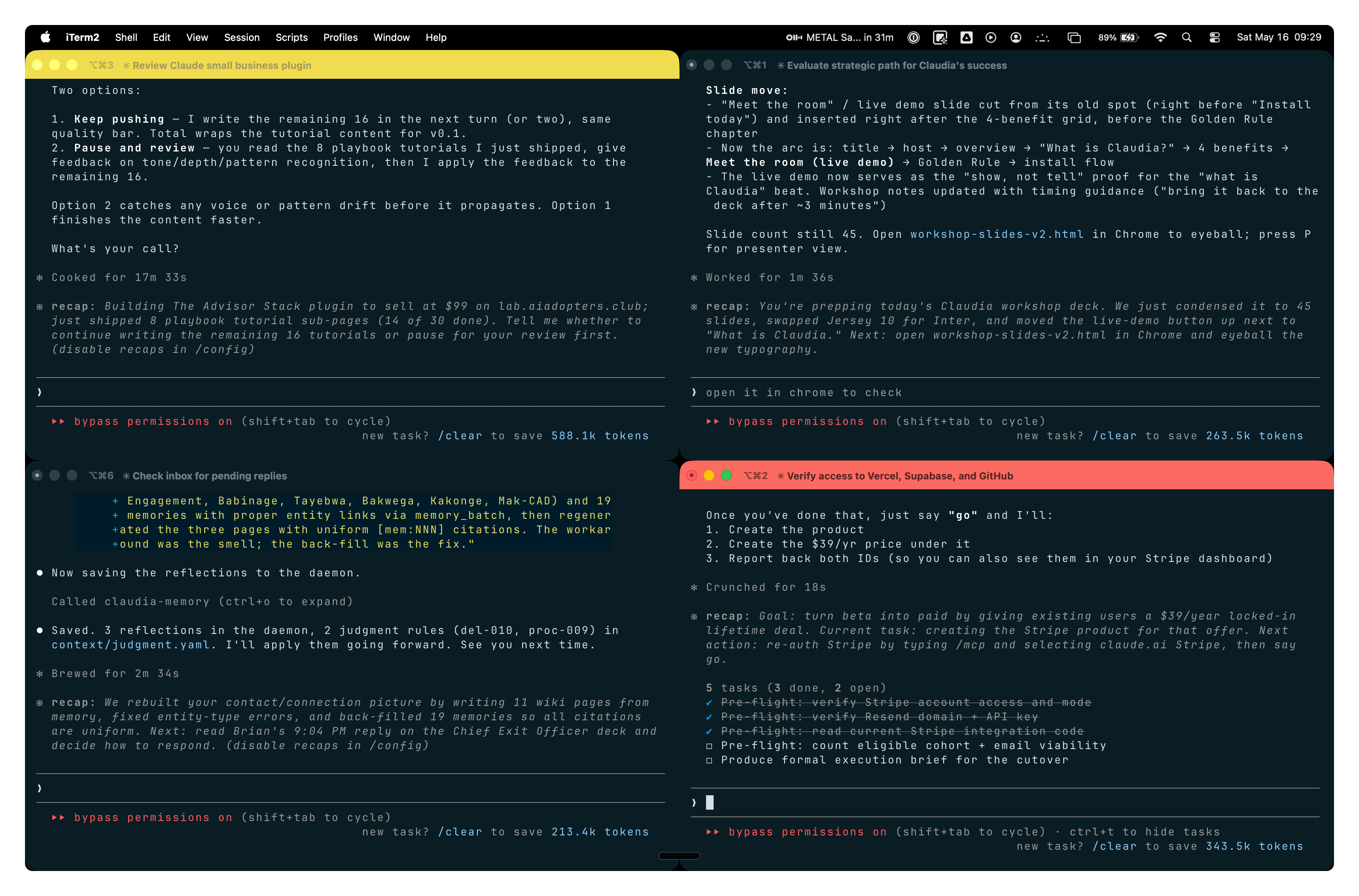
Cadence · my Saturday morning
You decide . She does the work.
A brief in the morning, a wrap-up at night, and helpers working in the background while you run your day.
Pause. Let them look at the four panes for a few seconds before you speak.
Each pane is a different job running on its own. This is Cadence: she works while you decide.
Daily rhythm: morning brief to start, end of day to close, and she remembers all of it tomorrow.
Free uphead .
Stop trying to hold it all in your head. Let her keep the details, so you can do what only you can: decide, push back, and think bigger. Use AI like Yoda, not R2-D2.
The mindset shift they will remember a week from now.
Most people ask AI to agree. The leverage is asking it to push back.
Install today.
claudia.aiadopters.club
Adapt & Create.
Drop the URL. If they did not finish during the workshop, this is their landing page.
Open for Q&A. Most questions come after they install at home.